App development is getting popular nowadays. Because many people are using mobile apps for daily works. We use apps for chat, shopping, banking, games, study and many other things.
So, many people want to learn app development. Some people learn it for job. Some people learn it to create their own apps. Also, many companies need app developers for making mobile apps.
Learning app development becomes easier when you learn one thing at a time. First think about what kind of app you want to make. After that, pick one software and start learning slowly.
These software programs help to write code, test apps and fix errors. Some software is free and some software is paid. So, choose the software based on your need and computer capacity also.
App Development Software
App development software is used to make mobile apps. Without these tools, creating apps is not easy. Because you need one place to write code, test the app and check mistakes.
Some software is used for Android apps. Some software is used for iPhone apps. Also, some software can make both Android and iPhone apps using same code.
For beginners, choosing the right software is important. If the software looks too hard, learning may become slow. So, start with one software first and practice it properly.
1. Microsoft Visual Studio
Microsoft Visual Studio is one of the software programs used by many developers. It is used for app development, software development and web development also.
When you open Visual Studio first time, it may look little heavy. Because there are many options and tools inside it. But after using it for some days, the basic things become easier.
Inside Visual Studio, you can write code, test the project and fix errors. So, developers no need to use many different programs for normal coding work.
Visual Studio supports many programming languages. Also, it gives code suggestions while typing. This can help beginners to write code little faster and find some mistakes quickly.
There is a free version for beginners. Though, Visual Studio may use more RAM while running. So, if your computer has good RAM, the software will work smoother.
2. Android Studio
If you want to make Android apps, Android Studio is one of the software programs you will probably use first.
When beginners install Android Studio for first time, it may look little confusing. There are many options, menus and settings. But after using it for few days, most people become comfortable with it.
In Android Studio, you can do most app work in one place. You can write code, check the app and see if something is not working properly.
Some people use Kotlin for Android apps. Some people still like Java. The good thing is you can use either one inside Android Studio.
Android Studio is free to use. Though, it may run little slow on low-end computers. Because Android Studio uses more RAM compared to some other software programs. You can download the latest version from the Android Studio official website.
3. Flutter
Flutter is becoming popular nowadays. Many developers are using Flutter because it can create Android app and iPhone app using same code.
Normally, Android app and iPhone app may need different work. But with Flutter, some of the same code can be used for both apps. So, developers can save some time.
Flutter is created by Google. It uses Dart language. At first, Dart may look new for beginners, but after some practice it becomes easy to understand.
Flutter is also good for making app screens. It has many ready-made design parts. So, developers can create nice looking app screens without starting everything from zero.
Some beginners may feel Flutter is confusing in the beginning. That is normal. After creating few small apps, the working method becomes more clear. If you want to learn Flutter, visit the Flutter official website for tutorials and documentation.
4. React Native
Many web developers already know JavaScript. So, when they want to make mobile apps, React Native becomes one option. Because they can use some of the things they already learned before.
With React Native, one project can be used for Android and iPhone apps. This means some work can be reused instead of doing everything again.
This is useful for people who want to save development time. Also, many companies are using React Native for mobile apps.
At the same time, React Native may need some native coding for complex apps. So, it is still good to learn how mobile apps work before making bigger projects.
People who already know JavaScript may find React Native little easier to understand.
5. Apache Cordova
If you already know HTML, CSS and JavaScript, Apache Cordova can be easier to understand. Many web developers use Cordova because of this reason.
Using Cordova, you can make mobile apps using web languages. So, web developers no need to learn everything from beginning.
The same code can be used for Android and iPhone apps. This is useful for simple apps and small projects.
Though, Cordova is not best for heavy apps and big games. Because some apps may become slow when using many plugins.
For simple apps, Cordova can be useful. But for large apps with more features, other tools may be better. More information about plugins and setup is available on the Apache Cordova website.
6. Xamarin
Xamarin is another software used for app development. It is mostly used by developers who know C# language.
One reason people use Xamarin is, they don’t need to write everything again for another mobile app. Some parts of the code can be used again. So, it can save some work.
Many companies use Xamarin for business apps. Because it works well with Microsoft tools and services.
Beginners may need some time to understand Xamarin. The setup may look little confusing at first. But if you already know C#, it may be easier to learn.
For people working with Microsoft software, Xamarin can be a useful option.
7. Quickbase
Quickbase is little different from normal app development software. Many people use it when they want to create apps without writing too much code. Low-code simply means less coding is needed while creating the app.
So, many businesses use Quickbase to create apps faster. They can make work management apps, project tracking apps and other company tools without spending too much time on coding.
Quickbase is used by many companies for internal work. It can help teams manage projects and daily tasks in one place.
Though, Quickbase is mainly useful for companies. For individual beginners, the pricing may feel costly.
If a company wants to create internal apps without spending too much time, Quickbase can be useful.
Learning App Development
Many people think app development is very hard. At first it may look confusing. But after learning little by little, things start making more sense.
First, choose one software and start learning that. Learning many tools together is not a good idea. Most beginners get confused when they try that.
Watching videos is good for learning. But only watching videos will not help much. After learning something, try it yourself and make a small app.
Start with small apps first. Maybe a calculator app or a simple notes app. Don’t worry if mistakes happen. Every developer makes mistakes while learning.
Practice is very important in app development. Because writing code again and again helps you understand things better.
Which Software Should You Choose?
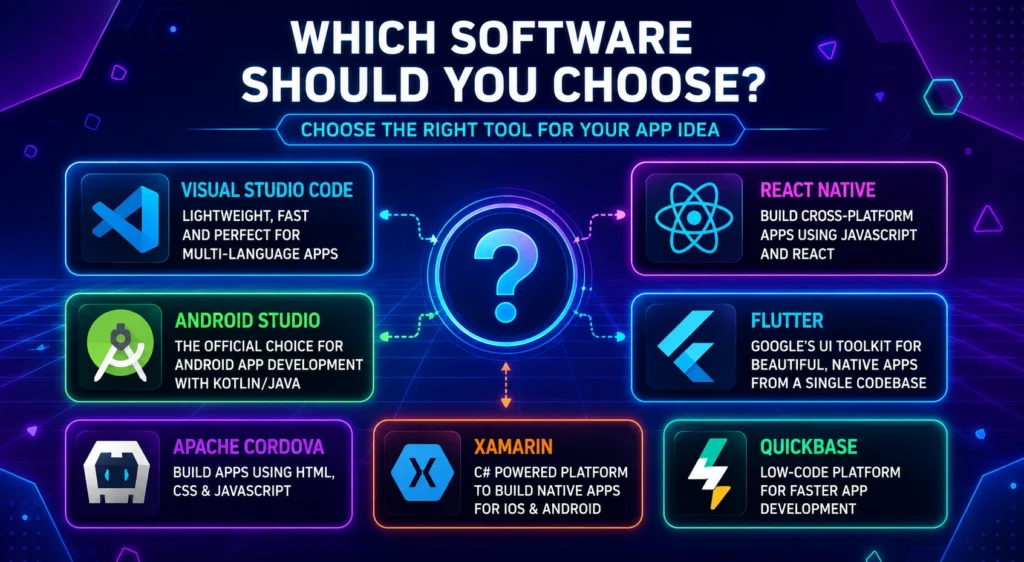
The software depends on what app you want to make. If you want Android apps, Android Studio is a good choice.
If you want Android app and iPhone app together, Flutter and React Native are good options. Many developers are using these tools nowadays.
People who already know HTML, CSS and JavaScript can try Apache Cordova. People who know C# may feel more comfortable with Xamarin.
So, don’t confuse by seeing many tools. Choose one software based on your skill and start learning.
After learning one tool properly, you can try other tools also. This makes learning more simple.
Final Words
App development is growing every year. Because people are using mobile apps for many daily works.
There are many app development tools available nowadays. Some people use Android Studio. Some use Flutter or React Native. It mainly depends on what they want to build.
Start with one software first and spend some time learning the basics before jumping into other tools.
After some time, creating apps becomes easier. Then you can move to bigger projects.