Every digital marketer wants to make daily work simple. Pinterest marketers know this very well because Pinterest work has many small things. You need to search ideas, create pins, write titles, add descriptions, find keywords, choose good colors and post regularly. If you do all these works manually, it will take more time.
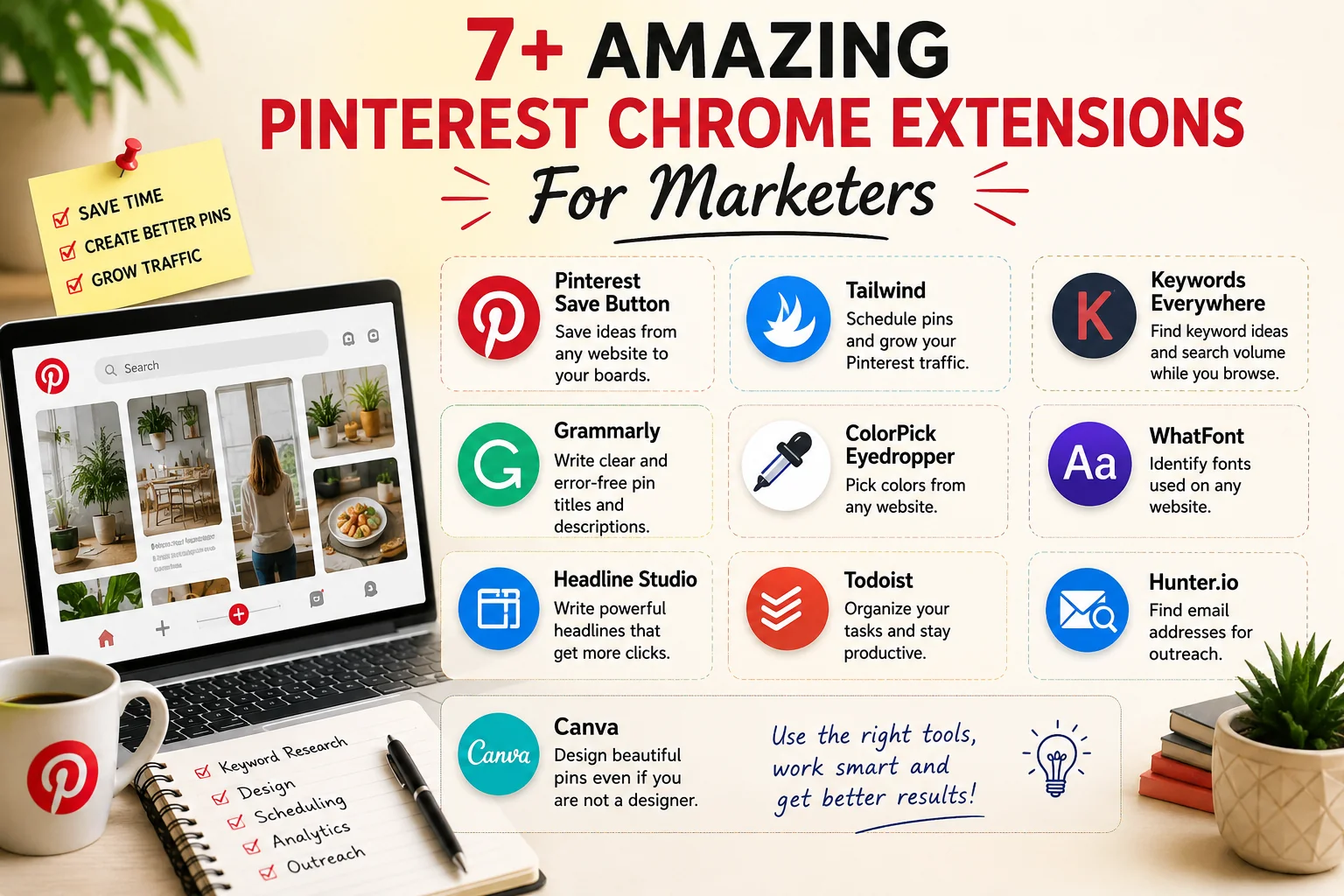
That is why Chrome extensions are useful. Some tools are small only, but when you use them daily, you can save a lot of time. In this article, we are going to see some useful Pinterest Chrome extensions for marketers.
Why Pinterest Marketers Need These Extensions
Pinterest is not only a place to upload images. Many people use Pinterest to search ideas. They search for recipes, home decor, fashion, blogging tips, travel ideas, products and many more things. So if you want traffic from Pinterest, your pin should look good. Title should be clear. Description should have proper keywords.
For that, some browser tools can help. One tool helps to save ideas. One tool helps to schedule pins. Some tools help in writing, colors, fonts and keyword research. But don’t install all extensions at once. First check what work you are doing daily. Then install only useful tools.
If you are a beginner, don’t install all extensions at once. First use the tools that are really needed for your Pinterest work. Too many extensions can slow down your browser. So use only useful tools and remove the tools that you don’t use.
Pinterest Save Button
Pinterest Save Button is a simple extension, but very useful for Pinterest users. When you browse any website and see a good image or idea, you can save it directly to your Pinterest board. This is useful when you are collecting ideas for your future pins.
For example, if you see one good blog image, recipe photo, product design or home decor idea, you can save it quickly. Many times we see a good idea and later we forget where we saw it. So this extension helps to keep those ideas in one place.
This is small tool only, but useful while collecting ideas. If you are planning Pinterest content regularly, this extension can save time. You can also check the official Pinterest Save Button guide for more details.
Tailwind
Tailwind is mainly useful for scheduling Pinterest pins. If you are posting pins manually every day, it will take time. Some days you may forget also. With Tailwind, you can plan your pins and schedule them. This is useful for bloggers and website owners who want to stay active on Pinterest.
The Tailwind extension also helps to save and schedule pins from websites. So while browsing, you can quickly add pins to your schedule. Before using Tailwind, check the latest plan. Some features may be free and some features may need paid plan. To know about the Tailwind browser extension, check the official Tailwind extension page.
Keywords Everywhere
Keywords are important for Pinterest also. Many beginners think Pinterest is only for pictures. But actually Pinterest works like a search engine. People search using words. So your pin title and description should have the right keywords.
Keywords Everywhere helps to find keyword ideas and related terms. This is useful for Pinterest, blogging, YouTube and SEO work also. But don’t add keywords everywhere like spam. Use them naturally. If the description looks strange, users may not like it.
Grammarly
Grammarly is useful for writing. Pinterest marketers need to write pin titles, descriptions, blog titles and sometimes emails. When we type fast, small mistakes can happen. Grammarly helps to find spelling mistakes and grammar mistakes.
This tool is useful for bloggers and marketers. But don’t accept every suggestion blindly. Sometimes it may change your sentence style. So after using Grammarly, read the sentence once by yourself also.
ColorPick Eyedropper
Pinterest is a visual platform. So colors are very important. Sometimes we see a good color on a website or image. But we don’t know the exact color code. At that time ColorPick Eyedropper is useful. It can pick the exact color from a web page.
It gives HEX and RGB color code. You can use that color in Canva, Photoshop or any design tool. This tool is small only. But while creating Pinterest pins, it is very handy.
WhatFont
WhatFont is useful for finding font names. Sometimes we see a nice font in a website or blog. But we don’t know what font it is. WhatFont helps to find the font name, size and style. For Pinterest pins, font is important. If the text is not readable, people may not click.
So this extension can help you get font ideas. But don’t use too many fonts in one pin. Simple font is always better.
Headline Studio
Headline Studio is useful for title writing. Pinterest title is very important. If your title is not interesting, people may scroll without clicking. This tool can help you improve titles for blog posts and Pinterest pins.
But one thing, don’t use fake clickbait. If the title is attractive but the content is not useful, users will not trust your website. So title should be clickable, but it should also be honest.
Todoist
Pinterest work needs planning. You may need to create pins, write descriptions, schedule pins, update old pins and check analytics. If you don’t write these tasks somewhere, you may forget. Todoist helps to manage your tasks.
You can create a simple Pinterest task list. For example, create 5 pins today, write 5 descriptions, schedule pins, check boards and update old content. This is useful if you manage blog and Pinterest together.
Hunter.io
Hunter.io is useful for outreach work. Some Pinterest marketers need to contact bloggers, brands or website owners. It may be for collaboration, guest post, affiliate work or business purpose. Hunter.io helps to find email addresses from websites.
This tool is not needed for everyone. But if you are doing outreach, it can save time. Use it carefully. Don’t send spam emails. Send only useful and clear messages.
Canva
Canva is not exactly a Chrome extension topic, but Pinterest marketers use Canva a lot. Most beginners create Pinterest pins using Canva. You can create pin templates, blog images, product images and social media designs. Pinterest needs good visuals. So your pin should be clean and easy to read. If your pin has too many colors, too much text and too many fonts, people may skip it.
So Canva is very useful for Pinterest marketers. You can keep it bookmarked for quick use. For beginners, Canva is enough to create good Pinterest pins. You don’t need advanced design software in the starting stage. But keep your design simple. Clear text and clean design work better than overloaded pins.
My Suggested Tools For Beginners
If you are a beginner, don’t install everything. Start with Pinterest Save Button, Canva, Grammarly, Keywords Everywhere and Tailwind. These tools are enough for basic Pinterest work.
After that, if you need design help, use ColorPick Eyedropper and WhatFont. If you do outreach work, then Hunter.io can be useful. Use tools based on your work. Don’t install tools only because others are using them.
Safety Before Installing Extensions
Before installing any Chrome extension, check reviews and permissions. Some extensions may ask for more access than needed. So install only from trusted sources. Also remove extensions that you don’t use. Too many extensions can slow down your browser. Chrome extensions are useful, but tools alone will not bring Pinterest traffic.
You still need good pin design, proper keywords, useful content and regular posting. One important thing is, Chrome extensions only help your work. They will not bring Pinterest traffic automatically. For Pinterest growth, you still need useful content, good pin design, proper keywords and regular posting.
Conclusion For Pinterest Chrome Extensions
In the above article, we discussed some amazing Pinterest Chrome extensions for marketers. These tools can help in saving ideas, scheduling pins, finding keywords, checking grammar, choosing colors, finding fonts, writing titles and managing tasks.
But remember, extensions only make the work easier. If you want Pinterest traffic, create good pins, use proper keywords and post regularly. Then these tools will help you save time and improve your Pinterest marketing work.